Español
 عربى
عربى русский
Content
- 1 What Is 10G Copper? The 10GBASE-T Standard Explained
- 2 How 10G Copper Works: Encoding, Alien Crosstalk, and Cable Construction
- 3 Cable Categories for 10G Copper: Cat6, Cat6A, and Cat7 Compared
- 4 10G Copper vs. 10G Fiber: Distance, Cost, and Where Each One Wins
- 5 Application Scenarios and Selection Points for 10G Copper
- 6 Installation and Maintenance Guidance for Reliable 10G Copper Links
- 7 FAQ: 10G Copper Questions Buyers Ask Most
- 7.1 Can I run 10G copper over my existing Cat6 cabling?
- 7.2 How is 10G copper different from SFP+ fiber or DAC links?
- 7.3 Does 10G copper support PoE for Wi-Fi 6 and 7 access points?
- 7.4 Which components must match to build a compliant 10G copper channel?
- 7.5 Is Cat7 worth specifying instead of Cat6A for 10G copper?
- 8 Related Reading and Site Resources
Short answer first: for links that stay inside one building and within 100 meters, 10G copper, meaning 10GBASE-T Ethernet running over Cat6A or Cat7 structured cabling, is the most practical and cost-efficient way to deliver 10 Gbps to desks, access points, cameras, and switches. Fiber takes over where distance, electromagnetic interference, or backbone aggregation demands exceed what twisted-pair cabling can support.
This guide walks through how 10G copper works, which cable categories actually carry it, where it beats fiber and where it loses, and what procurement teams should verify before signing a purchase order. The perspective is deliberately practical: we manufacture keystone jacks, patch panels, and patch cords for network cabling projects delivered to more than 45 countries, and the points below reflect the questions that distributors, integrators, and contractors raise with us most often.
Key conclusion: 10G copper over Cat6A cabling is the default choice for in-building 10 Gbps horizontal links up to 100 meters, while fiber remains the right tool for backbone and long-distance runs.
What Is 10G Copper? The 10GBASE-T Standard Explained
10G copper refers to running 10-Gigabit Ethernet over balanced twisted-pair cabling through the familiar RJ45 interface. The IEEE ratified the technology as 10GBASE-T in 2006 under the 802.3an standard, and it is still the only way to reach 10 Gbps over generic office cabling without changing the connector that every network device already uses. That connector compatibility is the quiet reason copper has stayed relevant: a 10G copper port speaks to existing PCs, printers, phones, and cameras without adapters, media converters, or new device inventories.
Compared with a gigabit link, 10GBASE-T is a far more demanding exercise in signal discipline. The operating bandwidth rises to 500 MHz, all four pairs transmit and receive simultaneously, and multi-level encoding combined with digital signal processing separates the overlapping signals at each end. This is why the cable plant itself, not just the switch, becomes the limiting factor: every jack, panel, patch cord, and meter of horizontal cable in the channel must hold its tolerances across that entire spectrum.
Backward negotiation is another practical advantage. Modern 10GBASE-T ports typically also support 1G, 2.5G, and 5G speeds, so a switch refresh can precede a cabling upgrade and both investments can be phased across budget cycles. Power over Ethernet, including the higher 802.3bt power classes, rides on the same four pairs, which matters enormously for Wi-Fi access points and IP cameras that need multi-gigabit data and substantial power in a single cable.
Bandwidth rating is the cleanest way to see why cable category matters so much for 10G copper. Each category is defined against a frequency range measured in megahertz, and 10GBASE-T needs spectrum up to 500 MHz to place its signal. Lower categories simply do not offer that spectrum, no matter how careful the installation is. The column chart below compares the rated channel bandwidth of the four categories that buyers ask about most often. Keep one rule in mind as you read it: rated bandwidth is a necessary condition for a 10G copper channel, not a complete guarantee by itself.
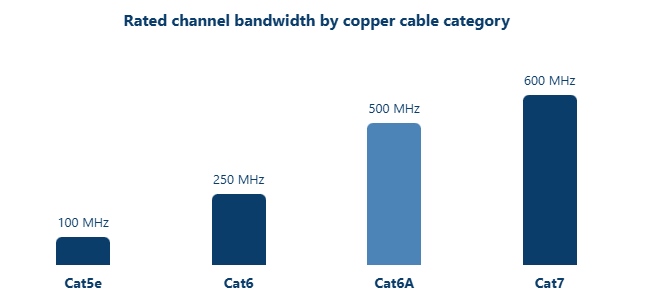
The chart tells the 10G copper story in one glance. Cat5e stops at 100 MHz, which is comfortable for gigabit but leaves no room for 10GBASE-T. Cat6 doubles that to 250 MHz, enough for short-distance attempts but short of the 500 MHz the standard expects. Cat6A reaches 500 MHz, exactly the spectrum 10GBASE-T was designed around, and this is why the industry treats it as the baseline for new 10G copper cabling. Cat7 extends to 600 MHz, adding margin and, in most constructions, full shielding on top. Two practical notes follow from these numbers. First, when a supplier offers a 10G-rated Cat6 patch cord, read it as a short-reach convenience rather than a replacement for a Cat6A channel. Second, bandwidth is verified at the component and channel level through laboratory and field testing, so ask any manufacturer or wholesaler for test data at the full rated frequency before committing to a bulk order. Bandwidth also explains part of the price ladder, since tighter manufacturing tolerances at higher frequencies cost real production effort. It does not explain all of it, though, because crosstalk control and shielding add cost that the megahertz figure alone does not show. Use the chart to shortlist categories, then read the next section to understand what happens to the signal inside those megahertz.
Key conclusion: Cat6A is the minimum category to specify for a compliant 10G copper channel, because only its 500 MHz bandwidth matches what 10GBASE-T was designed to use.
How 10G Copper Works: Encoding, Alien Crosstalk, and Cable Construction
Under the hood, 10GBASE-T pushes each of the four pairs to carry data in both directions at once, using 16-level pulse amplitude modulation arranged into a 128-state constellation, with echo cancellation electronics peeling apart the overlapping transmit and receive signals. The engineering detail matters less to buyers than its consequence: signal integrity now depends on physical construction quality and installation discipline, not merely on a cable jacket label. Small deviations that a gigabit link would shrug off, such as an over-untwisted pair or a crushed section of cable, become measurable errors at 10 Gbps.
The single biggest enemy is alien crosstalk, often abbreviated ANEXT, which is interference coupled from neighboring cables in the same bundle. Unlike crosstalk inside a cable, alien crosstalk cannot be cancelled by the electronics at each end, so it must be controlled physically through pair separation, shielding, and careful bundling. This is exactly why a Cat6 link that certifies beautifully on its own can fail inside a dense tray of parallel runs, and why category standards for 10G copper tightened construction requirements so significantly.
Cable construction answers that challenge at several levels, and the shielding options deserve a closer look before you choose. The four configurations below cover almost every product you will see in a supplier catalog, and each makes a different trade-off between immunity, cost, termination effort, and grounding requirements.
- U/UTP Four bare pairs with no shield. Lowest cost and fastest termination, immunity relies entirely on cable balance, so it demands the most installation discipline.
- F/UTP One foil screen around all four pairs. Cuts alien crosstalk between neighboring cables noticeably and suits busy trays, at the cost of bonding and grounding work.
- U/FTP An individual foil around each pair. Strong control of pair-to-pair crosstalk inside the cable, a common choice for high-density Cat6A installations.
- S/FTP A braid screen over individually foiled pairs. The highest immunity level and the standard construction behind Cat7 cabling.
One grounding note applies to every shielded option: the metallic screen only works as designed when it is bonded correctly at the patch panel and the outlet hardware. An ungrounded or badly grounded shield can behave closer to an antenna than a barrier, which is why we always ask customers about their grounding practice before recommending a shielded 10G copper channel.
Key conclusion: 10G copper performance lives or dies on crosstalk control, so select the shielding level that matches your electrical environment instead of defaulting to the cheapest unshielded option.
Cable Categories for 10G Copper: Cat6, Cat6A, and Cat7 Compared
The table below condenses the category question into the numbers that matter for a 10G copper plan. Treat it as a selection filter rather than marketing copy, because every row carries a procurement consequence.
| Category | Rated bandwidth | Maximum 10G reach | Common construction | Role in a 10G copper plan |
|---|---|---|---|---|
| Cat5e | 100 MHz | Not rated | 4-pair UTP | Keep it for gigabit service; do not plan 10G copper on it |
| Cat6 | 250 MHz | About 55 m, verified case by case | UTP or F/UTP | Acceptable for short, low-density runs after field certification |
| Cat6A | 500 MHz | 100 m | U/UTP, F/UTP, or U/FTP | The default platform for new 10G copper horizontal cabling |
| Cat7 | 600 MHz | 100 m | S/FTP | The shielded choice for high-EMI sites and extra headroom |
Cat6 deserves a careful word, because it causes the most confusion in quotations. TIA guidance allows 10GBASE-T over Cat6 at reduced distances, commonly quoted as up to 55 meters, and shorter still inside dense bundles near other cables. Some projects use this successfully for short inter-cabinet or wall-to-desk runs, but each one must be field certified, and the channel margin is thinner than any of us would like. If a supplier offers 10G-capable Cat6 without mentioning distance limits, ask harder questions before you sign.
Cat6A is the mainstream answer and the one recognized by both TIA and ISO, as Class EA, for guaranteed 100-meter 10GBASE-T channels. It was engineered specifically around alien crosstalk control, it is available in unshielded and shielded versions, and its price has settled into mainstream territory after years of volume production. For a new 10G copper deployment, Cat6A is the safe default that will not need defending at the next audit.
Cat7 sits above it as an ISO-defined Class F system at 600 MHz, built on fully shielded S/FTP construction. One compatibility note matters here: formal Cat7 specifies GG45 or TERA connectors rather than plain RJ45, although many RJ45-terminated shielded cords and modules in supplier catalogs are built to Cat7-class performance. If your project documents demand Cat7, confirm connector compatibility across every component in the channel before ordering. Above both of these, Cat8 exists for short 30-meter 25G and 40G links in data centers, which is worth knowing even if it rarely applies to a horizontal office design.
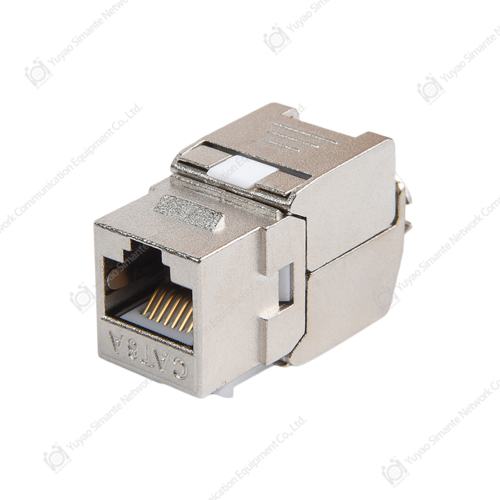
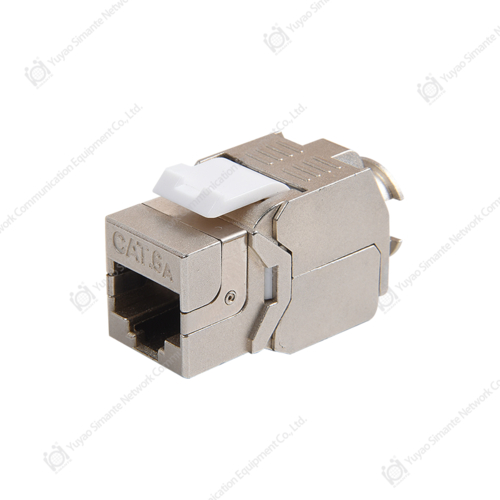
A compliant 10G copper channel is a chain of five elements: the work-area cord, the keystone jack behind the faceplate, the horizontal cable, the patch panel in the telecom room, and the equipment cord on the far side. Mixing performance grades along that chain burns the margin the standard leaves you, so experienced buyers source the whole channel from one manufacturer at one grade. The keystone jack is the component installers touch most and test least, which is why termination precision in a Cat6A module deserves as much scrutiny as the cable print on the box.
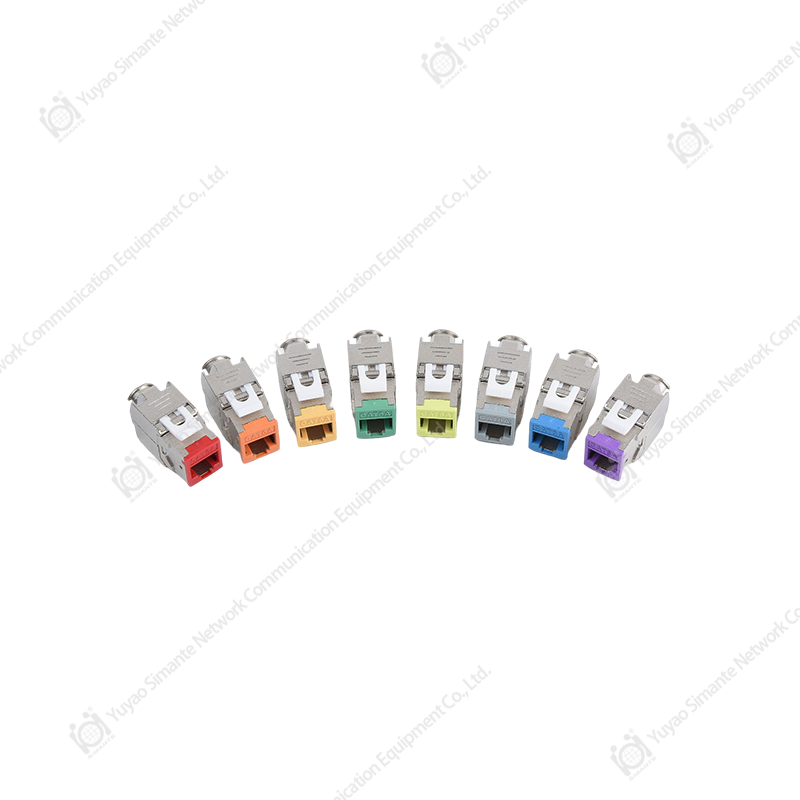 Shielded Cat6A Toolless Keystone Jacks for 10G ChannelsThese shielded, toolless Cat6A keystone jacks terminate work-area connections with consistent precision. Since termination accuracy at the jack is critical to keeping a 10G copper channel certified, sourcing them at the channel grade helps protect link margin.View Product →
Key conclusion: specify Cat6A as the default 10G copper platform, reserve Cat7 for demanding EMI or shielded-policy sites, and treat short Cat6 runs as certified exceptions rather than a design strategy.
10G Copper vs. 10G Fiber: Distance, Cost, and Where Each One Wins
Neither technology wins on every axis, so the useful question is which medium wins on the axes your project actually has. In broad terms, 10G copper owns the last 100 meters where endpoints live, thanks to RJ45 ubiquity, PoE support, and low per-channel component cost. Fiber owns everything beyond that: backbone risers, campus links, high-interference routes, and any path with growth plans past 10 Gbps.
Distance is usually the first number buyers compare when they weigh 10G copper against fiber. A 10GBASE-T channel and a fiber link solve the same 10 Gbps problem, yet they cover very different distances from the same rack. The horizontal bar chart below lines up the maximum reach of the most common media at 10 Gbps. Copper categories sit next to multimode fiber and a direct-attach twinax assembly so the proportions are easy to read. All values assume a standards-compliant, properly installed channel.
Maximum 10 Gbps channel reach by medium
The pattern in this chart is the architecture of most modern buildings in miniature. Direct-attach twinax assemblies top out around 7 meters, which makes them an in-rack tool for connecting adjacent switches rather than a cabling system. Cat6 covers roughly 55 meters at 10 Gbps when conditions are friendly, enough for some inter-floor closet runs but never a guaranteed horizontal design. Cat6A and Cat7 both carry 10G copper to the full 100-meter channel that structured cabling was designed around, and that number is what lets one telecom room serve an entire floor. OM3 multimode fiber extends the same 10 Gbps to 300 meters and OM4 to 400 meters, which is why risers and inter-building links default to fiber. Read together, the bars describe a clean division of labor: copper for the horizontal last 100 meters, fiber above and beyond it. There is no twisted-pair option past 100 meters at 10 Gbps, so a 120-meter run is a fiber decision no matter what the budget says. Latency differences between 10GBASE-T and fiber exist but are small enough for office and campus applications to ignore in most cases. Weight and diameter matter too, because 10G copper cables are thicker than their gigabit predecessors and fill riser space faster. Distance also interacts with topology, since a 100-meter copper reach usually removes the cost of intermediate closets on a typical floor. If your building already has an OM3 or OM4 backbone installed, the smart design keeps it for vertical distribution and lets Cat6A handle every horizontal drop.
Cost decides as many projects as raw performance does. The budget for one 10G copper link splits across four buckets: passive components, active ports, installation labor, and testing. The proportions shift with project size, but a typical office retrofit spends most of its money outside the switch. The donut chart below shows a representative split for a single 10G copper channel in a mid-size upgrade. Treat it as a planning ratio rather than a quotation.
Where the budget of one 10G copper channel typically goes
- Cable, keystone jacks, panels, and patch cords: 40%
- Switch ports and network interface cards: 25%
- Installation labor: 25%
- Testing and certification: 10%
The most common planning mistake is assuming the cable bill is the whole story. Passive components take the largest single share at around 40 percent, yet that share includes every jack, panel, and cord in the channel, not just the cable itself. Active ports take roughly a quarter, and here the comparison between 10GBASE-T and SFP+ fiber gets interesting, because port pricing and power draw vary noticeably between switch generations and can flip the arithmetic on large deployments. Installation labor matches the active share, and labor is where 10G copper asks for more care than gigabit did, since termination precision and bundling discipline directly affect channel margins. Testing looks small at 10 percent, but it is the cheapest insurance in the chart, because certification that catches one bad termination saves a return visit that costs more than the tester time. Wholesalers and project buyers should also compare channel cost rather than component price, since a slightly more expensive jack that installs faster can lower the labor line. Volume matters as well: ordering a complete channel kit from one manufacturer usually prices better than assembling components from several suppliers. Those figures assume new cabling, and a retrofit with difficult pathways pushes the labor share higher. Power budgets deserve a mention too, because dense 10GBASE-T switch configurations consume more electricity than fiber equivalents, and that shows up on the operating side of the ledger. Rework is the invisible fifth bucket, and the surest way to shrink it is to buy components with verifiable test data from the start.
Choose 10G copper when
|
Choose 10G fiber when
|
Key conclusion: use 10G copper for the last 100 meters where endpoints live, and hand the job to fiber once runs exceed 100 meters, cross buildings, or face serious interference.
Application Scenarios and Selection Points for 10G Copper
Where 10G copper earns its keep today
Enterprise office horizontal cabling remains the classic case: a Cat6A channel from a centralized telecom room to each work area, serving desks at multi-gigabit today and at 10G as devices refresh. The Wi-Fi story has become just as important, because modern 802.11ax and successor access points want multi-gigabit uplinks and high-power PoE over the same cable, and a Cat6A 10G copper drop satisfies both without pulling a second circuit. Surveillance and building automation follow the same logic, since NVR uplinks, camera aggregation, and controller traffic all benefit from headroom on copper runs that stay under 100 meters. In data centers, 10GBASE-T holds a role in end-of-row and middle-of-row topologies for runs up to 100 meters, while in-rack connections at a few meters typically use twinax assemblies and the vertical spine moves to fiber. Smart buildings and industrial edges round out the list, anywhere that gateways, controllers, and aggregation switches need robust multi-gigabit connectivity in electrically noisy surroundings such as production floors or rooftop equipment zones.
In the telecom room itself, the patch panel is where all of these horizontal runs land, and panel quality determines how much margin survives termination. A category-matched, well-built panel keeps every certified link certified after the installer leaves the building, which is why panel selection belongs in the specification, not in the last-minute hardware list.
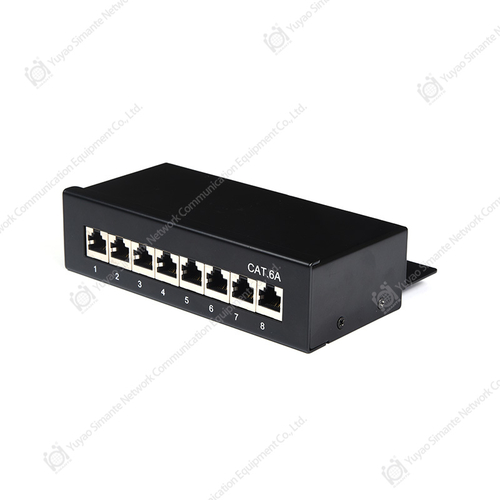 Cat6A Shielded and UTP Patch PanelsCat6A patch panels in multiple port counts and shielded or unshielded options land all horizontal runs in the telecom room. A category-matched, well-built panel preserves certified link performance, so panel quality belongs in the specification.View Product →
Selection points for procurement teams
- Keep the whole channel at one category and one performance grade, from work-area cord to patch panel, because a single weak link defines the entire channel.
- Match the shielding level to the electrical environment and confirm your team can bond shields correctly before choosing F/UTP, U/FTP, or S/FTP.
- Check PoE thermal assumptions: high-power PoE heats bundled cables, so plan conservative bundle sizes and prefer Cat6A for 802.3bt deployments.
- Ask every shortlisted supplier for component and channel test data covering insertion loss, return loss, NEXT, and alien crosstalk across the full rated frequency.
- Evaluate the manufacturer behind the catalog: in-house tooling, stable production capacity, OEM and ODM support, and packaging suited to distribution all predict smoother projects.
- Validate with samples terminated by your own installers before releasing a bulk purchase order, because real-world workmanship is part of the product.
Key conclusion: buy the 10G copper channel as one matched system from one accountable manufacturer, and let field samples, not catalog pages, make the final decision.
Installation and Maintenance Guidance for Reliable 10G Copper Links
Installation rules that protect the channel
Most 10G copper problems are installed, not manufactured, which is good news because installation habits are fixable. Preserve the twist of each pair all the way to the termination point and never untwist more than about 13 millimeters at Cat6A jacks and panels. Respect the minimum bend radius, at least four times the cable outside diameter and more for shielded designs, especially behind faceplates and inside crowded cabinets. Keep horizontal runs separated from unshielded power lines and fluorescent fixtures, and avoid long parallel paths along motor or lighting circuits. Limit bundle sizes and replace over-tight cable ties with hook-and-loop fasteners, because crushing pressure distorts the pair geometry that 10GBASE-T depends on. Terminate with the correct dies and tools on category-rated hardware, then certify every permanent link and the full channel, adding alien crosstalk spot checks on the densest panels.
The equipment cords at both ends deserve the same seriousness as the fixed cable, because a bargain cord can undo a certified channel. Keep a stock of tested, category-matched cords in standard lengths so installers never improvise with leftovers from an older project.
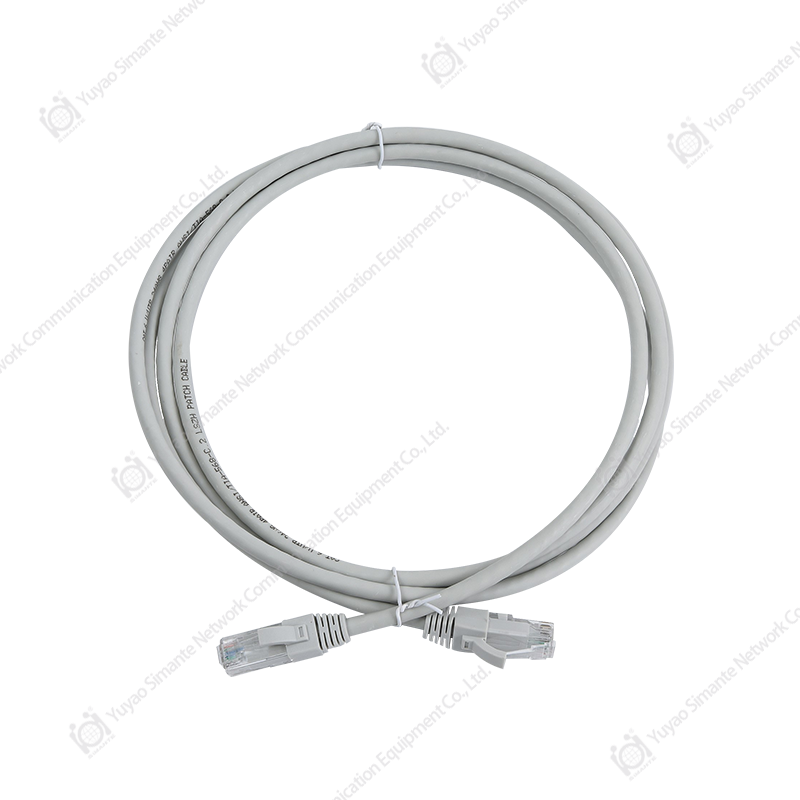 Cat6A and Cat8 Patch CordsCategory-matched patch cords, including Cat6A UTP and S/FTP options, keep certified channels performing at both ends. Keeping tested cords in standard lengths prevents installers from improvising with mismatched leftovers that degrade margin.View Product →
Keeping the plant healthy after handover
Label both ends of every link with the same identifier, keep dust protection in place on unused ports, and maintain a patching discipline that records every move, add, and change. Re-certify any link that gets re-terminated or rerouted rather than assuming it still meets grade. Replace damaged patch cords instead of re-crimping them, since field-crimped repairs rarely hold Cat6A tolerances. Schedule a periodic audit that samples channels, checks cabinet temperatures in high-PoE zones, and reconciles the documentation with what is actually in the racks. Plants that follow this routine pass their 10G copper audits years later without drama, and plants that skip it usually discover the difference during a move, add, or change at the worst possible time.
Key conclusion: a 10G copper channel is only as good as its worst termination, so enforce twist, bend radius, bundling, and certification rules at installation and keep re-certifying after every change.
FAQ: 10G Copper Questions Buyers Ask Most
The questions below come up repeatedly in conversations with distributors, integrators, and project contractors. The answers are kept short and practical so you can lift them straight into your own project documentation.
Can I run 10G copper over my existing Cat6 cabling?Sometimes, with conditions. TIA guidance allows 10GBASE-T over Cat6 at reduced reach, commonly up to about 55 meters, and shorter inside dense bundles near alien crosstalk sources. Have every candidate link field certified before moving users onto it, and build new horizontal capacity on Cat6A wherever a guaranteed 100 meters matters. |
How is 10G copper different from SFP+ fiber or DAC links?10GBASE-T delivers 10 Gbps over four twisted pairs on an RJ45 interface, which keeps device compatibility, PoE, and 100-meter reach in one medium. SFP+ fiber modules cover longer distances and higher immunity but need transceivers and fiber patching, while direct-attach twinax cables serve only a few meters inside the same rack. Most buildings sensibly use all three, each where it fits best. |
Does 10G copper support PoE for Wi-Fi 6 and 7 access points?Yes. 10GBASE-T runs over the same four pairs that carry 802.3bt PoE, with power delivery at the switch port reaching roughly 90 watts in the highest class. The design caveat is heat: higher power warms bundled cables, so plan conservative bundle sizes and specify Cat6A, whose headroom absorbs the temperature rise without derating performance. |
Which components must match to build a compliant 10G copper channel?All of them: the horizontal cable, the keystone jack, the patch panel, and both patch cords should share one category and one performance grade. Standards allow only a limited number of connection points inside the channel, so resist unnecessary couplers. Buying the channel as a matched set from one manufacturer gives you test data that actually applies to the combination you installed. |
Is Cat7 worth specifying instead of Cat6A for 10G copper?Choose Cat7 when the site demands maximum shielding, when your regional practice expects Class F systems, or when you want extra headroom in harsh electrical environments. For most office and commercial projects, Cat6A delivers the same guaranteed 100-meter 10G copper channel at lower cost and with easier termination, which is why it remains the volume choice among buyers. |
Related Reading and Site Resources
If you are mapping out a 10G copper rollout, two pages on this site extend the picture directly: one explains which structured cabling products support high-speed networks across both copper and fiber systems, and the other introduces our 30,000-square-meter factory in Yuyao, China, including production lines, equipment, and quality control. As a manufacturer and supplier of keystone jacks, patch panels, patch cords, and fiber connectivity for projects in more than 45 countries, we support distributors, wholesalers, and integrators with standard catalog items as well as OEM customization.
- Which structured cabling products support high-speed networks
- About our factory: production lines, equipment, and quality control
Key conclusion: source your 10G copper channel as one matched system from a manufacturer that can prove every component with test data, and the standard will take care of itself.