Español
 عربى
عربى русский
Content
In modern home and office environments, cluttered cables not only affect aesthetics but can also pose safety hazards. Using a cable manager allows for quick organization of power cords, data cables, and charging cables, achieving an efficient and tidy spatial layout. This is the fastest, safest, and most visually appealing method for cable management.
Cable Manager Selection: Material and Type Determine Organization Effectiveness
Choosing the right cable manager is the first step in cable organization. Common types on the market include:
- Velvet/Cable Tie Managers: Suitable for adjustable-length cable bundles, highly flexible, and reusable.
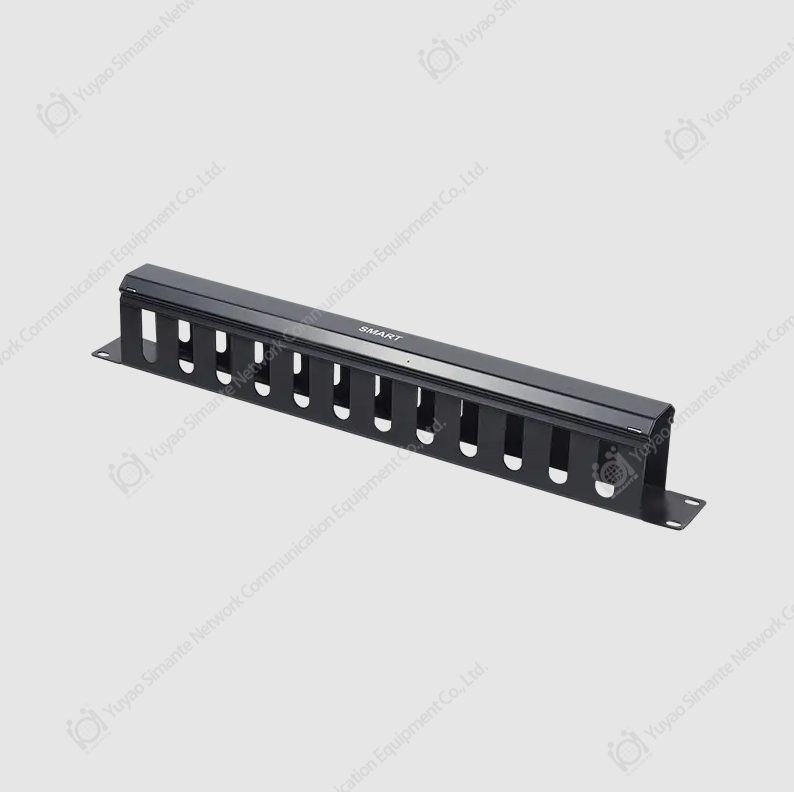
- Plastic Cable Tray Managers: Suitable for desktop and wall mounting, high load-bearing capacity, and can conceal most cables.
- Desktop Cable Management Boxes: Suitable for office desktops, centrally managing multiple power and charging cables while providing dust protection.
For example, a high-quality desktop cable manager can hold up to 12 power cords, and user tests show it can reduce desktop cable clutter by more than 80%.
Cable Organization Methods: Fast, Visual, and Maintainable
Even with the best cable manager, the organization method determines the final result. Recommended Three-Step Method:
Cable Categorization:
Pack data cables, power cords, and charging cables separately, using colored Velcro to distinguish their uses.
Cable Fixing and Storage:
Use cable trays or desktop management boxes to secure cables along the edges of your desk or walls to prevent tangling.
Categorization and Management:
Label long or multiple cables for easy identification and maintenance later.
Studies show that organizing your workspace using these methods reduces cable search time from an average of 2 minutes to less than 30 seconds, significantly improving work efficiency.
Aesthetics and Safety Combined: Additional Advantages of Cable Management
Besides neatness, cable management offers significant safety and aesthetic advantages:
- Preventing Tripping and Cable Wear: Secure cables reduce the risk of accidental tripping and extend cable life.
- Improving Space Aesthetics: Hiding messy cables makes your workspace or home environment look clean and tidy, improving visual appeal.
- Reducing Electromagnetic Interference: Orderly cable arrangement reduces tangling and effectively reduces signal interference from some devices.
Small Space, Big Impact: Home and Office Case Studies
In the home, the power cords behind TVs and game consoles typically exceed eight. Using a multi-channel cable manager can organize them within an hour, preventing tangles and loose cables.
In the office, the average workstation has 6-10 cables. Organizing them uniformly using desktop cable boxes increases space utilization by approximately 25%, and makes cleaning and moving equipment much easier.
Cable managers are the best tool for solving messy cable problems. Choosing the right material and using scientific organization methods not only improves the tidiness of the office and home environment but also protects cables and increases work efficiency.